
Why Most Home Service Companies Lose Money on Ads and What PPC Tactics Actually Fix It
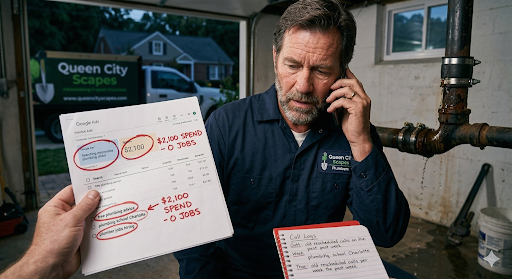
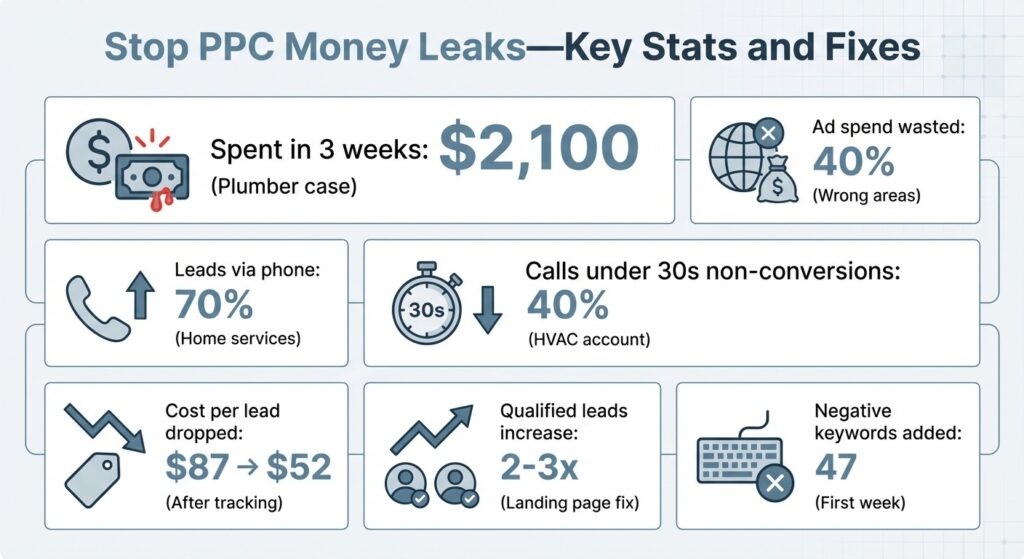
Last Tuesday I opened a DM from a plumber in Phoenix who’d spent $2,100 in three weeks and gotten exactly zero jobs.
His screenshot showed search terms like “free plumbing advice,” “plumbing school near me,” and—my personal favorite—”plumber jobs hiring.” His agency told him the campaign “needed more time to optimize.”
I see this pattern every week. Contractors show me their Google Ads dashboards, point to the spend column, and ask: “Where did my money go?” The answer is almost always the same three places: calls nobody tracked, clicks from people who can’t hire you, and search terms you should’ve blocked on day one.
I used to work inside Google Ads as an account strategist. Now I audit leaky contractor accounts because I kept watching the same preventable disasters play out. The platforms work—but only if you close the gaps where budget disappears before a single qualified call rings.
You don’t need to become a PPC expert. You need to understand three control levers well enough to hold anyone—agency or yourself—accountable. Track what converts. Target who can actually hire you. Block what wastes clicks.
The Real Cost of “Set It and Forget It”
A roofing company in Dallas hired me after burning through $18,000 in six months with an agency that promised “qualified leads.” When I pulled the account, I found call-only ads running without call tracking, campaigns targeting a 50-mile radius that included three cities they didn’t serve, and zero negative keywords.
The agency’s monthly reports showed “impressions up 40%”—which is marketing speak for “we have no idea if this worked.”
The Math That Actually Matters
If you spend $2,000 and get ten calls but can’t prove which three became jobs, you’re flying blind. If five of those calls came from outside your service area or were price-shoppers who hung up in twelve seconds, your real cost per lead just tripled.
The fix isn’t spending more. It’s plugging the leaks so every dollar has a job to do—and you can see whether it did that job.
Fix One: Make Every Call and Form Submit Provable
Conversion tracking sounds technical, but it’s just proof. When someone fills out your contact form or calls the number in your ad, can you tie that action back to the keyword and ad that triggered it?
I start every audit the same way: I ask to see their conversion tracking setup. Half the time, there isn’t one. The other half, it’s tracking form submissions but ignoring calls—which is a problem when 70% of leads come through the phone.
Call-only ads are popular in home services because people want to talk to a human before they book a $4,000 HVAC repair. But if you’re not using call tracking software that logs duration, source, and outcome, those ads are just expensive billboards.
What Working Conversion Tracking Actually Looks Like
| Element | What You Need | Why It Matters |
|---|---|---|
| Form Tracking | Tracking snippet on “thank you” page | Proves which keywords drove form submissions |
| Call Tracking | Dynamic number insertion (CallRail, CallTrackingMetrics) | Logs which keyword triggered each phone call |
| Call Duration Filter | Mark calls under 30 seconds as non-conversions | Eliminates wrong numbers and hangups from your data |
| Outcome Logging | Team logs which calls became booked jobs | Reveals actual cost per job, not just cost per call |
You set up Google Ads conversion actions for both form submissions and phone calls. For forms, you add a tracking snippet to your “thank you” page. For calls, you use a dynamic number insertion service that swaps in a unique trackable number for each visitor and reports back to Google Ads which keyword triggered the call.
Then you go further. You mark calls under 30 seconds as non-conversions, because a 12-second hangup isn’t a lead. You train your team to log which calls turned into booked jobs so you can calculate actual cost per job, not just cost per call.
One HVAC company I worked with discovered that 40% of their “leads” were existing customers calling to reschedule or ask billing questions. Once we filtered those out and focused on new customer calls over 60 seconds, their real cost per lead dropped from $87 to $52—not because we changed the ads, but because we finally measured what mattered.
The Setup Takes One Afternoon
The technical setup takes an afternoon. Google’s support docs walk through conversion action creation step by step, and most call tracking platforms integrate directly with Google Ads.
If you’re working with an agency, ask them to show you the conversion tracking setup in your account and explain how calls are being logged. If they deflect or say “it’s all handled,” that’s your red flag.
Fix Two: Stop Paying for Clicks from People Who Can’t Hire You
Geo-targeting and service area settings control who sees your ads. Get this wrong and you’ll spend a fortune on clicks from people 60 miles outside your coverage zone who bounce the second they realize you don’t serve them.
Google Ads offers two main targeting options: location targeting (where people are physically located) and location intent (where people are searching for services). For home service companies, you want location targeting set to “presence”—meaning people physically in your service area—not “presence or interest,” which includes anyone searching for your city from anywhere.
Why Your Service Area Radius Matters More Than You Think
A 25-mile radius sounds reasonable until you map it and realize it includes towns you’d charge a $200 trip fee to reach. I worked with a landscaping company running a 30-mile radius from their shop. When we pulled the data, 35% of their clicks came from the outer 10 miles—areas they rarely served because the drive time killed profitability. We tightened to 20 miles and their cost per qualified lead dropped 28%.
Here’s the setup process:
- In Google Ads, go to campaign settings and choose “location options”
- Select “presence: people in or regularly in your targeted locations”
- Define your radius or list specific zip codes
- If you serve multiple cities, create separate campaigns for each
- Adjust bids and budgets based on which areas convert better
For ppc for home services, geo-targeting isn’t optional—it’s the difference between paying for clicks that can become jobs and paying for clicks that were never going to convert.
The Google Business Profile Trap
Service area businesses have an additional setting in Google Business Profile that feeds into Local Services Ads. Make sure your service area there matches your Google Ads targeting, or you’ll get calls from outside your zone that Google still charges you for.
The weekly check is simple: pull a location report in Google Ads to see where your clicks are coming from. If you spot cities or zip codes outside your service area, add them as location exclusions.
Fix Three: Block the Search Terms That Burn Budget
Negative keywords are the filter that keeps your ads from showing for irrelevant searches. Without them, you’ll pay for clicks from people looking for jobs, free advice, DIY tutorials, or services you don’t offer.
I pulled a search terms report for an electrician last month and found “electrician salary,” “how to become an electrician,” “free electrical inspection,” and “electrical code questions”—none of which would ever become a paying job. He’d spent $340 on those clicks in two weeks.
How Negative Keywords Actually Work
You build a list of terms that signal someone isn’t a buyer—words like “free,” “DIY,” “how to,” “salary,” “jobs,” “school,” “training,” “code,” “permit,” and any service you don’t offer. You add these at the campaign or account level so they filter across all your ads. Then you check your search terms report weekly to catch new junk queries before they drain your budget.
Local intent keywords are the flip side: the search terms that signal someone is ready to hire now. “Emergency plumber near me,” “same day HVAC repair,” “roof leak repair [city name]”—these are high-intent, high-conversion searches worth bidding aggressively on.
A Real-World Transformation
One roofing company I worked with was bidding on “roof repair” as a broad match keyword. That triggered their ads for “roof repair cost calculator,” “roof repair DIY,” and “roof repair training.” We switched to phrase match and added 47 negative keywords in the first week. Their click-through rate jumped because their ads only showed for relevant searches, and their cost per lead dropped 34%.
Your Starter Negative Keyword List
In Google Ads, go to “negative keywords” under the tools menu and create a list. Start with the obvious blockers:
- free
- DIY
- jobs
- salary
- school
- training
- how to
- cost (by itself)
- cheap
- affordable
- code
- permit
- license
- requirements
Then add any services you don’t offer—if you’re a plumber who doesn’t do water heaters, add “water heater” as a negative.
Check your search terms report every week. Go to “keywords,” then “search terms,” and sort by cost. Look for queries that spent money but didn’t convert. Ask yourself: would this search ever become a job? If not, add it as a negative.
I’ve seen accounts transform in 30 days just from aggressive negative keyword management. A pest control company was spending $120/day and getting 2-3 calls. We added 80 negative keywords in the first two weeks and tightened their match types. Same budget, 7-8 calls per day.
The Landing Page and Bid Management Layer
Once your tracking, targeting, and keywords are clean, two more levers control whether your budget works efficiently: where you send clicks and how much you pay for them.
Landing Pages: The 2-3x Conversion Multiplier
Landing pages matter because a click to your homepage costs the same as a click to a dedicated service page, but the service page converts 2-3x better. If someone searches “emergency water heater repair” and lands on your homepage with a generic “we do plumbing” message, they’re bouncing.
I audited an HVAC account where every ad pointed to the homepage. Their cost per conversion was $140. We built three landing pages—one for AC repair, one for heating repair, one for installation—and matched each ad group to the relevant page. Cost per conversion dropped to $91 in three weeks.
Your landing page checklist:
- Headline matches the search intent
- One clear call to action (phone number or form)
- Social proof (reviews or years in business)
- Service area mentioned
- Mobile-friendly design
Bid Management: Manual vs. Automated
Bid management controls how much you pay per click. Google Ads offers automated bidding strategies—maximize conversions, target CPA, target ROAS—but these only work if your conversion tracking is accurate and you have enough data. For most small accounts (under 30 conversions per month), manual CPC with bid adjustments is safer.
Budget caps are your safety net. Set a daily budget you can afford to lose while testing, then scale only after you’ve proven the unit economics work. If your average job is worth $800 and you’re paying $60 per lead with a 30% close rate, you’re making money. If you’re paying $150 per lead, you’re not.
The Weekly Accountability Checklist
Here’s the routine that keeps accounts from leaking budget. Every Monday morning, spend 20 minutes checking these five things:
1. Conversion Data
How many calls and form submissions did you get last week? How many turned into booked jobs? What’s your cost per lead and cost per job?
2. Search Terms Report
Sort by cost. What queries spent the most money? Were they relevant? Add any junk terms to your negative keyword list.
3. Location Performance
Where are your clicks coming from? Are you spending money outside your service area? Adjust bids or exclusions accordingly.
4. Landing Page Performance
Which pages are converting? Which are bouncing? If a page has a high bounce rate, test a new headline or call to action.
5. Budget Pacing
Is your daily budget running out early? If so, either raise the budget or lower bids so your ads show all day.
This isn’t advanced optimization. This is basic maintenance that prevents the three leaks I see in every broken account: untracked conversions, wasted geography, and irrelevant clicks.
Start Here Tomorrow
You don’t need to rebuild your entire account tonight. Start with the leak that’s costing you the most money right now.
If you’re running ads but can’t prove which calls became jobs, fix conversion tracking first. Set up call tracking, mark short calls as non-conversions, and start logging outcomes.
If you’re getting clicks from outside your service area, tighten your geo-targeting tomorrow. Pull a location report, exclude anywhere you don’t serve, and adjust your radius to match where you actually want to work.
If you’re paying for “free” or “DIY” or “jobs” searches, spend an hour building a negative keyword list and checking your search terms report.
The goal isn’t perfection. The goal is knowing where your money went and whether it did its job. That’s the difference between PPC that builds your business and PPC that just builds someone else’s retainer.